
In the interconnected world of the internet, understanding where traffic comes from is critical for security, analysis, and optimization. Whether you’re sifting through server logs to find malicious connections or streamlining your network’s traffic management, identifying the sources of incoming IP addresses can be a game-changer. Enter the Syrup Shroud Project: a Python-based tool designed to map public IP addresses to their BGP Autonomous System Numbers (ASNs) effortlessly.
This tool is a perfect companion for system administrators, network engineers, and cybersecurity professionals. Let’s dive into what Syrup Shroud offers, how to use it, and why it could become your go-to tool for analyzing network logs.
What is Syrup Shroud?
Syrup Shroud simplifies the often tedious task of mapping IP addresses from log files to BGP ASNs. Using the RIPE API, the script performs WHOIS lookups to retrieve information about ASNs associated with public IPs. The output can be summarized in a clean, easy-to-read table or exported to a JSON file for further automation.
Here’s a glimpse of what the script can generate:
+---------+---------------------------------------------------------+----------+---------------+-------------------------------------------------+
| BGP ASN | BGP Description                                         | IP Count | Total Entries | Sample IPs                                      |
+---------+---------------------------------------------------------+----------+---------------+-------------------------------------------------+
| 398324  | censys-arin-01                                          |        7 |            14 | 206.168.34.49, 162.142.125.210, 162.142.125.196 |
| 14061   | digitalocean-asn                                        |        5 |             5 | 146.190.41.214, 139.59.58.140, 159.203.44.105   |
| 8075    | microsoft-corp-msn-as-block                             |        4 |             6 | 20.118.68.252, 13.83.43.70, 4.151.218.179       |
| 398705  | censys-arin-02                                          |        3 |             5 | 167.94.145.31, 167.94.145.103, 167.94.146.56    |
+---------+---------------------------------------------------------+----------+---------------+-------------------------------------------------+
This table provides:
- BGP ASN: The unique identifier for the ASN.
- BGP Description: Details about the network operator.
- IP Count: Unique IPs found in the log files.
- Total Entries: Total occurrences of the ASN in the logs.
- Sample IPs: Up to three example IP addresses from the logs.
Installation Made Easy
Getting started with Syrup Shroud is a breeze. Here’s how:
$ git clone https://github.com/TheScriptGuy/syrup-shroud
$ python3 -m venv .venv
$ source .venv/bin/activate
$ pip install -r requirements.txt
That’s it—you’re ready to analyze your logs!
Features That Shine
The Syrup Shroud script is packed with handy features:
- Regular Expression Searching: Filter log entries matching specific patterns.
- Column Separator Option: Easily locate the column containing IPs in your log format.
- RIPE Database Integration: Minimize API queries by caching results.
- JSON Output: Export data for seamless integration into automated workflows.
How It Works: Practical Examples
Here are a few scenarios where Syrup Shroud proves its worth.
Example 1: Basic Usage
Imagine you’re analyzing SSH connection attempts in a log file named server-log.2024-11-26. The log entries look like this:
Nov 26 00:00:15 server Connection from 218.92.0.172 port 39171 on 123.123.123.123 port 22 rdomain ""
To extract IP addresses matching Connection from.*port 22, use the script with a space (" ") as the separator and specify the column containing the IP address (7th column, zero-indexed):
(.venv) $ python3 main.py --separator " " --column 6 /syslog/server-log.2024-11-26 'Connection from.*port 22'The output:
+---------+-------------------------+----------+---------------+--------------+
| BGP ASN | BGP Description         | IP Count | Total Entries | Sample IPs   |
+---------+-------------------------+----------+---------------+--------------+
| 4134    | chinanet-backbone no.31 |        1 |             1 | 218.92.0.172 |
+---------+-------------------------+----------+---------------+--------------+
Example 2: Leveraging the RIPE Database
To reduce API queries, use the --ripedb option to store and reuse results:
(.venv) $ python3 main.py --separator " " --column 6 --ripedb ripe.json /syslog/server-log.2024-11-26 'Connection from.*port 22'The script will load cached data from ripe.json and update it with any new discoveries.
Example 3: JSON Output for Automation
Need the results in JSON format? Add the --json flag:
(.venv) $ python3 main.py --separator " " --column 6 --ripedb ripe.json --json output.json /syslog/server-log.2024-11-26 'Connection from.*port 22'This produces:
{
    "4134_chinanet-backbone no.31": {
        "total_log_entries": 1,
        "ips": [
            "218.92.0.172"
        ]
    }
}
Visualization
You can of course generate a word cloud of the data too! The word cloud images below are based off a single day’s worth of attempts to connect to my lab environment.
To show the Total Log Entries
(.venv) $ python3 generate_wordcloud.py -i output.json -o wordcloud-total_log_entries.png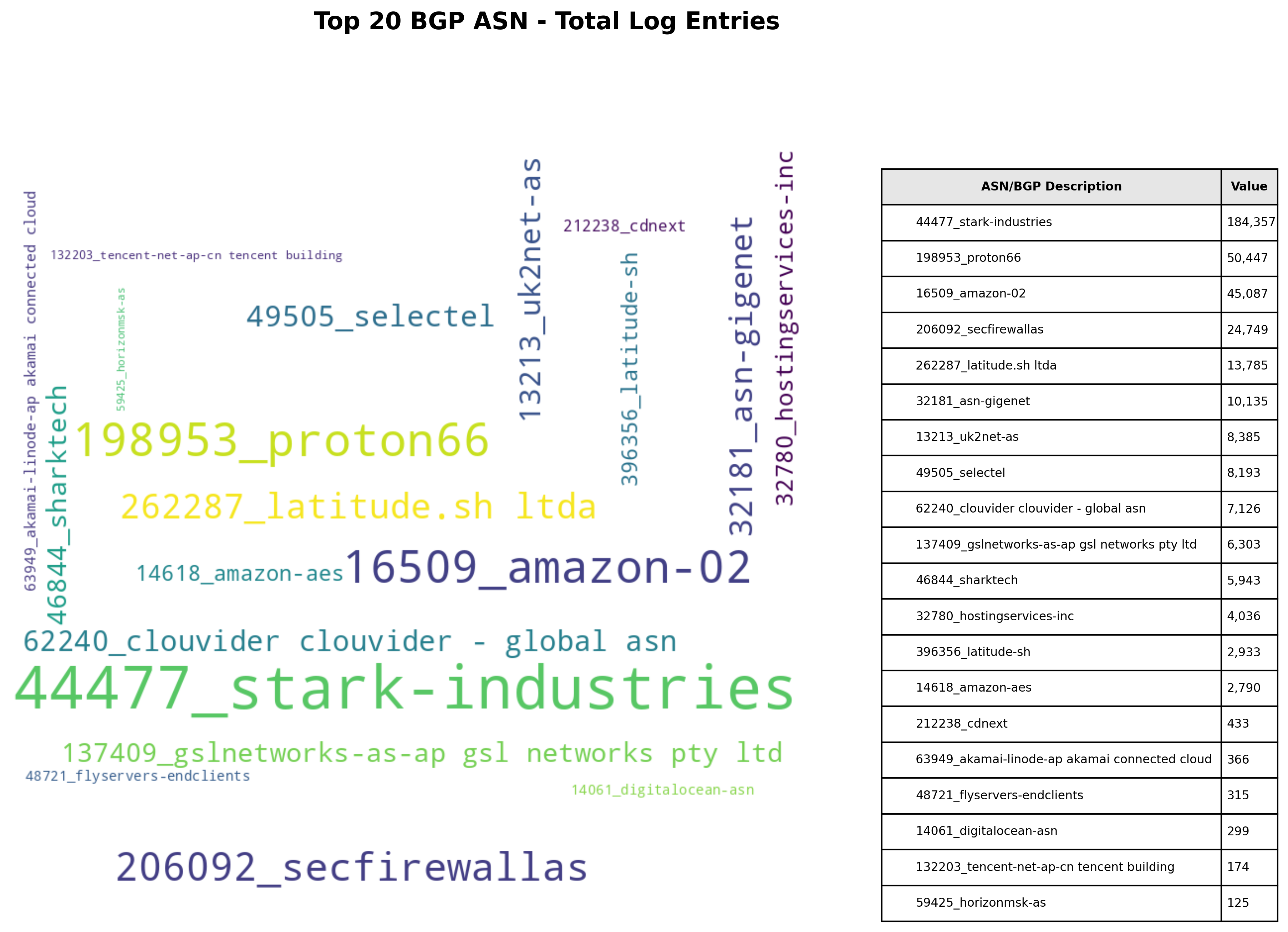
(.venv) $ python3 generate_wordcloud.py -i output.json -o wordcloud-total_log_entries.png --metric ip_count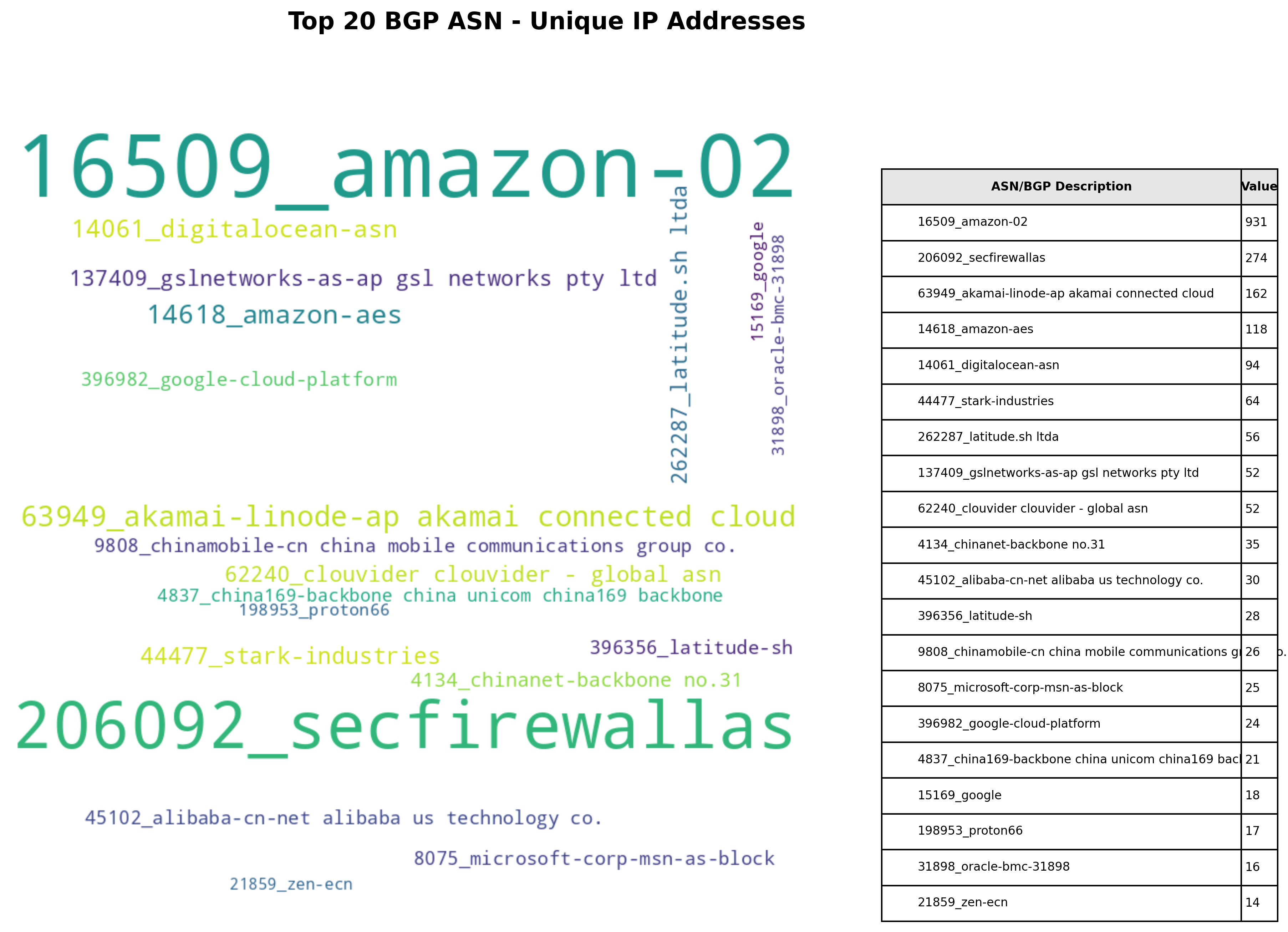
I hope you find this tool useful!
Side note – this is an extension of the Molasses-Masses project.
 Personal Blog