
In an attempt to understand a bit more about bitcoin, I wanted to see how to build a portable docker bitcoin-core node. Here are some steps on how to build it and some design considerations.
At a high-level these are the steps we’ll be following:
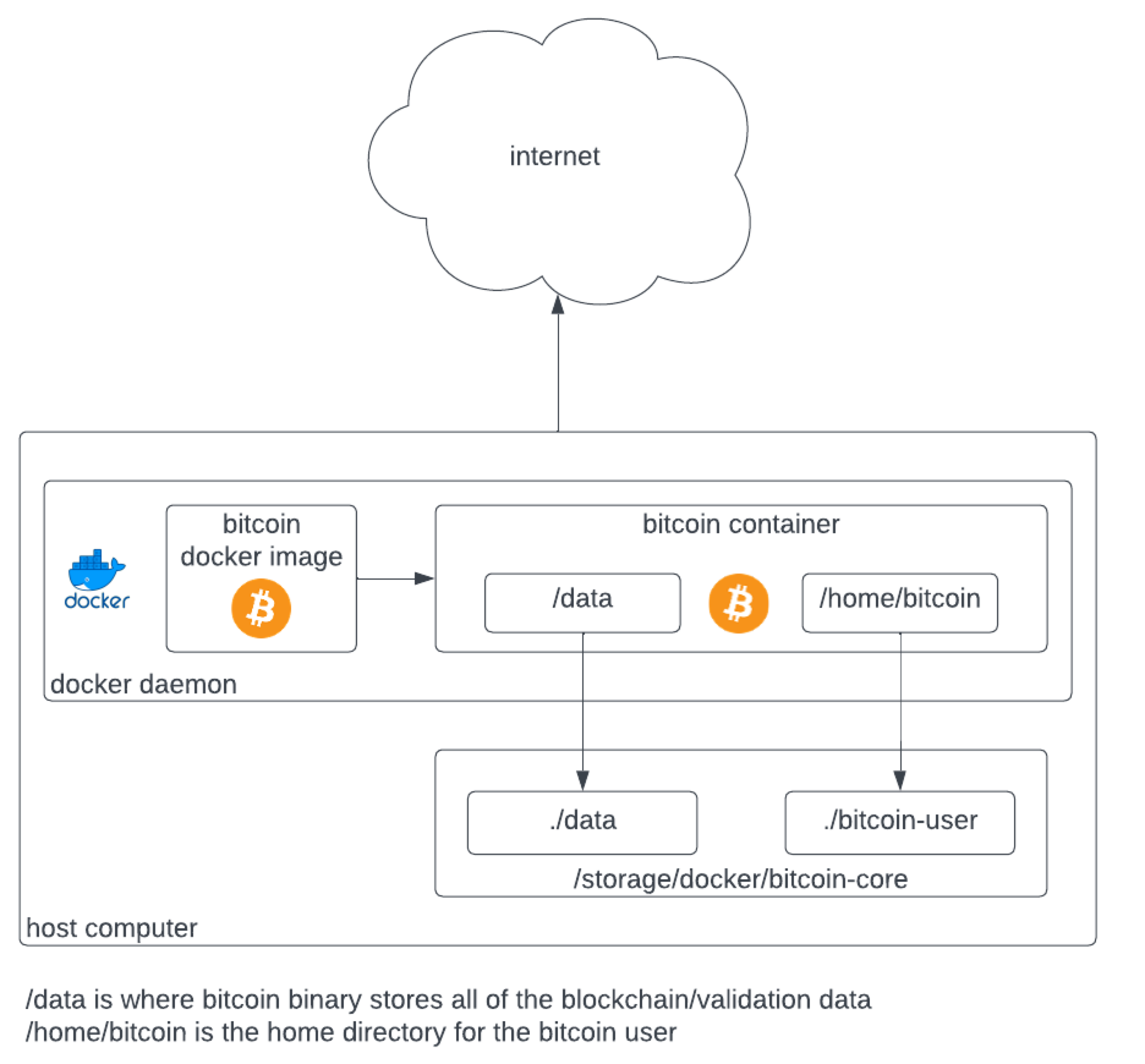
- High-level diagrams of file locations
- Build scripts that will be run during container execution.
- Build a Dockerfile
- Build a Docker Image
- Build a Docker Container
High-level diagram of bitcoin docker architecture
Building scripts
bitcoin.conf
This script ensures that the RPC users who access Bitcoin’s RPC are only allowed from the 192.168.1.0/24 network. This would need to match whatever your home network is. The RPC username and password are used for the graceful shutdown of the bitcoin binary. This bitcoin.conf file does not allow for hosting a wallet.
By default the bitcoin binary listens on TCP 8333.
daemonwait=1datadir=/data
maxmempool=4096
txindex=1
maxreceivebuffer=20
maxuploadtarget=1000
disablewallet=1
rest=1
rpcallowip=192.168.1.0/24
rpcuser=bitcoinuser
rpcpassword=b1tc01np4ssw0rd
server=1

[main]
startup.sh
This script is essential to help start and (more importantly) shutdown the bitcoin-core binary in a correct way when the docker container is shutdown.
#!/bin/sh

BINDIR="/bin"
BITCOIN_BINDIR="/usr/local/bin/"
BITCOIN_DATADIR="/data"
echo "functions" # Function to gracefully
stop bitcoind stop_bitcoind() {
  echo "Stopping bitcoind..."
  $BITCOIN_BINDIR/bitcoin-cli -rpcuser=bitcoinuser -rpcpassword=b1tc01np4ssw0rd stop
}

# Function to handle the SIGTERM
signal handle_sigterm() {
  echo "Received SIGTERM signal. Performing graceful shutdown..."
  stop_bitcoind
  exit 0
}

echo "trap" # Trap SIGTERM signal and invoke the handler
trap 'handle_sigterm' SIGTERM

echo "starting bitcoin"
# Start bitcoind
$BITCOIN_BINDIR/bitcoind -conf=/data/bitcoin.conf -noproxy -daemon

echo "bitcoind pid"
BITCOIN_PID=`$BINDIR/cat $BITCOIN_DATADIR/bitcoind.pid`

echo "wait" # Wait for the script to be terminated
wait "$BITCOIN_PID"
Entrypoint
#!/bin/sh
exec "/data/startup.sh"
Dockerfile
While this Dockerfile does also install tor, it is not configured in bitcoin.conf. You can optionally remove it if you don’t need it.
At a high-level this Dockerfile will:
- Install the files needed for compiling the bitcoin binaries.
- Download the source code from the Bitcoin GitHub repository.
- Compile the Bitcoin source code. Take note of the make -j 4 line. This spawns 4 threads to help speed up the compiling of the source code. If you have a larger CPU, you can change that to a higher number.
- Copy the compiled bitcoin binaries into a new image layer.
- Install the alpine packages required to run the bitcoin binaries.
- Copy the entrypoint.sh file, create a bitcoin user (by default docker containers run as root – definite no no).
- Set the default user as bitcoin
- Set the entrypoint.sh file.
FROM alpine:latest as build

#
# First get all the packages for
# the compile
#

RUN apk update && apk add git \
                          make \
                          file \
                          autoconf \
                          automake \
                          build-base \
                          libtool \
                          db-c++ \
                          db-dev \
                          boost-system \
                          boost-program_options \
                          boost-filesystem \
                          boost-dev \
                          libressl-dev \
                          libevent-dev \
                          vim \
                          tor

#
# Pull source code from bitcoin GitHub
#
RUN git clone https://github.com/bitcoin/bitcoin --branch master --single-branch

#
# Do the actual build
#
RUN (cd bitcoin && ./autogen.sh && \ ./configure --disable-tests \
                     --disable-bench --disable-static \
                     --without-gui --disable-zmq \
                     --with-incompatible-bdb \
                     CFLAGS='-w' CXXFLAGS='-w' && \
                     make -j 4 && \
                     strip src/bitcoind && \
                     strip src/bitcoin-cli && \
                     strip src/bitcoin-tx && \
                     make install )

FROM alpine:latest

#
# Copy the binaries from the build to our new container
#
COPY --from=build /usr/local/bin/bitcoind /usr/local/bin
COPY --from=build /usr/local/bin/bitcoin-cli /usr/local/bin

#
# Install all dependencies
#
RUN apk update && apk add boost boost-filesystem \
            boost-program_options \
            boost-system boost-thread busybox db-c++ \
            libevent libgcc libressl3.6-libcrypto \
            libstdc++ musl tor vim shadow

#
# Copy the startup script from
# the build context into the container
#
COPY entrypoint.sh /entrypoint.sh

RUN chmod +x /entrypoint.sh && chown root.root /entrypoint.sh
RUN /usr/sbin/groupadd -g 100000 bitcoin && /usr/sbin/useradd -u 100000 -g 100000 bitcoin

# Set the user to bitcoin
USER bitcoin

#
# Start the bitcoin server
#
ENTRYPOINT ["/entrypoint.sh"]
build-image.sh
This script is to build the docker image from the Dockerfile above.
REPOSITORY="myrepo"
IMAGENAME="bitcoin-node"
IMAGEVER="1.0"

IMAGETAG="$REPOSITORY/$IMAGENAME:$IMAGEVER"

docker build -t $IMAGETAG --no-cache -f Dockerfile
run.sh
Important to note that the REPOSITORY, IMAGE_NAME and IMAGE_VERSION variables need to match the tag that was defined in the build-image.sh script.
Make sure the BITCOIN_STORAGE variable is pointing to the correct location and that the ownership of the location is the same as the userid (100000) and groupid (100000) that was set in the Dockerfile above.
When a container runs, it’ll have access to all the resources available on the host. To limit how much resources the container can use, define the –cpu (set to 10 CPU’s in the script below) and –memory (set to 8GB in the script below) arguments correctly.
REPOSITORY="myrepo"
IMAGE_NAME="bitcoin-node"
IMAGE_VERSION="1.0"
IMAGETAG="$REPOSITORY/$IMAGE_NAME:$IMAGE_VERSION"

BITCOIN_STORAGE="/storage/docker/bitcoin-core"
CONTAINER_NAME="bitcoin-node"
\CONTAINER_NAME_OLD="$CONTAINER_NAME-old"

if [ "$(docker ps -aq -f name=$CONTAINER_NAME_OLD)" ];
then
	# If it does, remove it
	echo "Removing old container."
	docker rm -f $CONTAINER_NAME_OLD
fi

# Check if the container $CONTAINER_NAME exists
if [ "$(docker ps -aq -f name=$CONTAINER_NAME)" ];
then
	echo "Stopping container $CONTAINER_NAME_OLD"
	docker stop $CONTAINER_NAME
	# If it does, rename it to $CONTAINER_NAME_OLD
	echo "Renaming current container."
	docker rename $CONTAINER_NAME $CONTAINER_NAME_OLD
fi

docker create -v BITCOIN_STORAGE/data:/data \
    -v $BITCOIN_STORAGE/bitcoin-user:/home/bitcoin \
    --name=$CONTAINER_NAME \
    --cpus="10" \
    --memory="8192m" \
    $IMAGETAG

docker start $CONTAINER_NAME
And voila! You now have a portal docker bitcoin-core node container!
 Personal Blog